EverQuest Legends UI Updates

Home Forums General Discussion EverQuest Legends UI Updates

Viewing 6 posts - 16 through 21 (of 21 total)
  • Author
    Posts
  • #264488
    Drakah
    Keymaster

    There maybe something up with the group window not resizing after it hits the 6th person, I have to test this when I can.

    #264489
    Drakah
    Keymaster

    Apparently the group window will not play nice going horizontally. I put in a feedback about fixing this.

    #264490
    Drakah
    Keymaster

    Updated to v20.9. Edited the 2 Group Window versions. The 1st one now is a static size and fits Player 0 (yourself) thru Player 7 on the left. Player 8 will carry over to the bottom right, laying over the area (unfortunately) for Wis/Cold and below. This version is tighter so that more players would fit, but just could not fit everything. The Group Window that expands upwards after the 6th player is now another option on the right-click menu on the group window.

    #264491
    Drakah
    Keymaster

    Updated to v20.10 – added a dark background for Player 8 when it is on top of the stats info on the bottom right.

    #264492
    Drakah
    Keymaster

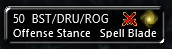
    Updated to v20.11 – replaced the PlayerWindow to a Basic version with the crossed swords attack animation from the original Krome UI. The default player window has been moved to #7 and is still accessible.

    #264496
    Drakah
    Keymaster

    Updated to v20.12 for today’s patch day, many files were updated to make it all current.

Viewing 6 posts - 16 through 21 (of 21 total)
  • You must be logged in to reply to this topic.