
Home › Forums › General Discussion › The Outer Brood Beta
- This topic has 16 replies, 4 voices, and was last updated 1 year ago by
Drakah.
-
AuthorPosts
-
October 9, 2024 at 6:15 pm #264134
Drakah
KeymasterI have checked out the UI’s and the only thing that seems to need an update so far is the EQUI_Animations file, adding in the TOB code.
I am attaching the EQUI_Animations file for the Krome UI here, as of 10/9/2024 to start.
If you want to do this to your own, open up your EQUI_Animations file in notepad,
and just above:<Ui2DAnimation item="A_Quarm">place:
<Ui2DAnimation item="A_TOB"> <Frames> <Texture>EQ_expansion_logos2.tga</Texture> <Location> <X>256</X> <Y>192</Y> </Location> <Size> <CX>128</CX> <CY>32</CY> </Size> <Hotspot> <X>0</X> <Y>0</Y> </Hotspot> </Frames> </Ui2DAnimation> <Ui2DAnimation item="A_TOBHover"> <Frames> <Texture>EQ_expansion_logos2.tga</Texture> <Location> <X>256</X> <Y>224</Y> </Location> <Size> <CX>128</CX> <CY>32</CY> </Size> <Hotspot> <X>0</X> <Y>0</Y> </Hotspot> </Frames> </Ui2DAnimation> <Ui2DAnimation item="A_TOBSelected"> <Frames> <Texture>EQ_expansion_logos2.tga</Texture> <Location> <X>256</X> <Y>256</Y> </Location> <Size> <CX>128</CX> <CY>32</CY> </Size> <Hotspot> <X>0</X> <Y>0</Y> </Hotspot> </Frames> </Ui2DAnimation>-
This topic was modified 2 years ago by
Attachments:
November 8, 2024 at 2:53 pm #264169KeymasterI just replaced the Tking Briar Cast Spell Window 13 Spells version with the 14 Spells version if you would like to use this for Beta, featured under the Add-Ons section. I figured I would not bother adding a separate download for both being only about 5 or so weeks away from launch.
December 1, 2024 at 6:05 pm #264182KeymasterAll interfaces are now published over from Beta and have been tested. The only 2 UI’s that need to pay some attention to is Adeptus & INTG TKing, as I removed EQUI_KeyRingWnd.xml file. If you use those UI’s, be sure to remove that file or else you will get an error.
December 2, 2024 at 9:59 pm #264189Garaddor
ParticipantDrakah,
I love that your still doing the UI’s. It makes my life so much more enjoyable because I can’t stand the default UI.
But using your instructions I can never get the UI to load properly.
You mention that we add your layout to our main folder and copy layout. I have tried it on Beta and it never works for me to do it that way. It defaults back to the default UI.I have had this issue for a long time now. So I get XML errors etc.
I am at wits end with this.Any chance you can point out anything. Can you please review your procedures in the read me file to make sure the steps are right.
I am not trying to question you but I really want to make this work.Thanks for any assistance in advance.
December 2, 2024 at 10:17 pm #264190KeymasterYou do not need my INI file, ever really, it was only there to get you started from what the screenshot was setup to be like. but the INI files should still work, providing you are using the same resolution that INI file was saved under. Otherwise, the windows will be all over the place.
The only change EQ did was how they are naming the INI files now, which I did not update in the Readme as an oversight, as you need to add in your class name now to the filename.
If it is loading Default, then my guess is you do not have the same folder name as what the INI file is looking for.
You should not be getting any XML errors, other than maybe “Note: Loading SUITE” messages, or maybe “Warning” messages. It is the major errors that I would need to know that would make the UI not load at all.
In general, you just need to pop in the folder and /loadskin while in game, choose the folder, and move the windows around. You really do not need to do much more than that.
December 2, 2024 at 10:28 pm #264191ParticipantOkay, I will try that tomorrow. Thanks for the reply to my query.
December 2, 2024 at 10:44 pm #264192ParticipantBtw I think I may have figured out the issue all along. It might be the name of the folder like you said. I just did this in Beta.
1: I took the old folder “drakah_intg_tking and moved it to another folder just to be safe.
2: Then I downloaded your new Brood zip file.
3: I took that drakah_intg_tking folder and put that in my beta ui folder.
4: I removed the read me file, and the two other zip files that come with it.
5: I loaded up the game and my windows were all over the place. I made sure that the UIfile i was loading was yours. Then I copied my layout from my main character and toggled all three check boxes for hot buttons etc. Taking care to make sure I had the correct resolution.
6: Presto…seems to be working now
Thanks for the coaching the last response you had. That helped me a lot.
December 2, 2024 at 11:27 pm #264193KeymasterAlways happy to help if I can.
December 3, 2024 at 11:04 am #264194Dave Williams
ParticipantThank you for your hard work on these
December 22, 2024 at 6:33 pm #264196Tmon
ParticipantDrakah, thank you again for supporting these UIs for so many years. I sent you a donation.
I have used Thomas King’s Celtic for nearly 20 years and remember when he created the unique EQ graphics over two decades ago. How time flies.
December 22, 2024 at 6:42 pm #264198KeymasterThank you so much bud, I appreciate it, truly 🙂 Just trying to keep all the stuff alive to still be usable. I should get back with Tking, see if he has any nostalgia he would like to contribute heh.
October 2, 2025 at 1:29 pm #264289ParticipantHello Drakah, it’s been awhile and I’m getting back into EQ.
I saw your post above about 14 spell slots. Are there now 14 spells in-game (TOB expansion)?
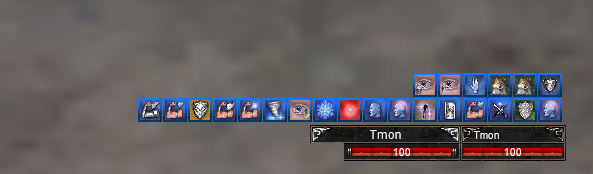
Also, on the Tking target window (picture below), I can’t find a way to grab it and move it around. When I right click on it, it is not locked, but moving my cursor all around looking for the grab spot (where the cursor turns into a plus) I can’t find that location. Can you help on this?
-
This reply was modified 1 year ago by
Tmon.
-
This reply was modified 1 year ago by
-
This reply was modified 1 year ago by
Attachments:
October 2, 2025 at 2:04 pm #264294KeymasterYes, there are 14 in total for the Cast Spell Window now.
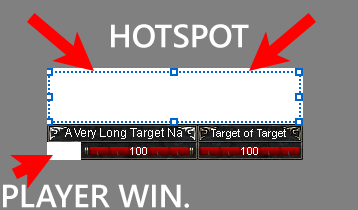
The hotspot to move the “target window” is above the window about 36px. That area is where the buff icons are for the target in an invisible border. Your cursor should change to a + sign when you are moused over it so you can lock/unlock it. (see screenshot)
The “player window”, which is designed to be 2 small boxes for combat state/combat anim/mail, is missing from the bottom left corner of your target window, which is why there is hole there. You need to move the “player window” inside that hole, then lock it down.
Other invisible borders should have a triangle on a corner so you can see that to use for moving/resizing windows.
-
This reply was modified 1 year ago by
Attachments:
October 2, 2025 at 2:24 pm #264297ParticipantThank you Drakah but it’s still not working. Check out this short video.
P.S. Yes I know about the combat window, I moved it out of that notch to make this video.
P.S.S. I finally found the spot … thank you very much Drakah
Attachments:
October 2, 2025 at 2:34 pm #264301KeymasterI will have to look when I am home, can’t really give a definite answer without being in game to see it. But the width that you have already looks like it was stretched to the left, so not sure why you can’t edit it again. Will be home in 2 hours’ish.
-
This topic was modified 2 years ago by
-
AuthorPosts
- You must be logged in to reply to this topic.
Recent Comments