

Forum Replies Created
-
AuthorPosts
-
Drakah
KeymasterA section has been made for EQ Legends on the downloads screen instead of a sub-button.
KeymasterKrome UI for EQL is now version 20.1.8 that now includes a “big” bank window! HUZZAH! 🙂 It is technically out of beta now too.
KeymasterAnother update to fix the group window resizing itself too early.
KeymasterI uploaded another version that now has the updated version of the CastSpellWnd that has the spell names. If the window comes up blank, it is because of Mnemonic Retention AA. Just add a point or 2 into it and the window will load up properly. If you do not have the AA yet, you can rightclick on the window, choose Display Types, and choose an alternate version in the meantime. Or, you can extract the ZIP file I have in the UI folder, that is the large spell icon version that does not have the spell names on it that is Mnemonic Retention friendly.
KeymasterYep, been battling it all night so I remade it from scratch. Only difference is you loose the spell gem spell names on it, so use “alt”. They buggered the screen code so it goes blank when I use it sadly. Anyway, this version automatically expands when you buy more spell slots, so thats a good thing. Then gem icons are more squarish though. Also, the whole UI is now based off of the Modern UI instead of Default, which is why all of the files are in there now.
KeymasterDelete gemicons04.tga thru gemicons28.tga. Those files are not needed as 1 of them were updated and does not need to be in the UI folder. Only the first 3 files needed to be there.
-
This reply was modified 2 months, 3 weeks ago by
Drakah.
KeymasterAll of them have been updated to version 20.1 🙂
KeymasterI looked at the overlapping text and it is because there is a lot of wording is all in the Default file. Just resize the window wider and it will not overlap.
KeymasterThanks Bud! <3 I sent you an email too
KeymasterThe UI files needed to fix the UI were in the beta files that would had fixed all that. I released and updated all the Beta files to Live files, so patch your UI to 19.9
As for the Key Ring window overlapping text, I see what you mean, though that window is not customized, and loads from Default. I would post about that oddity on the EQ Forums to let them know and I will upvote it 🙂 Be sure to screenshot it. Though, I would screenshot it from using the Default UI though so they don’t think it is a custom UI issue.
KeymasterGlad to hear you have it fixed. I know with the “All Bags” mod, only a few bags can be opened at a time, otherwise the next bag will seem to hide slots, and the next bag will be completely without slots. Its a known bug that Daybreak just has not fixed.
KeymasterYou can fix that width oddity though. I would exit out of EverQuest and manually edit your UI_Tmon file and look for [TargetWindow], and delete out that section for it. Save and close. Then go back into EverQuest and let it rewrite the information for that window, relocate/resize it. It should default to 256×92. The buff rows should of only been about 40’ish pixels high enough for 2 rows of buffs, though it can be stretched higher for more. Don’t forget putting the playerwindow in that hole though on the bottomleft.
KeymasterI will have to look when I am home, can’t really give a definite answer without being in game to see it. But the width that you have already looks like it was stretched to the left, so not sure why you can’t edit it again. Will be home in 2 hours’ish.
KeymasterYes, there are 14 in total for the Cast Spell Window now.
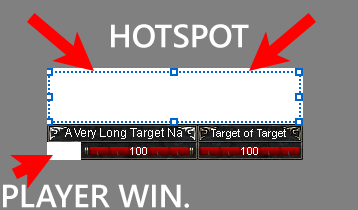
The hotspot to move the “target window” is above the window about 36px. That area is where the buff icons are for the target in an invisible border. Your cursor should change to a + sign when you are moused over it so you can lock/unlock it. (see screenshot)
The “player window”, which is designed to be 2 small boxes for combat state/combat anim/mail, is missing from the bottom left corner of your target window, which is why there is hole there. You need to move the “player window” inside that hole, then lock it down.
Other invisible borders should have a triangle on a corner so you can see that to use for moving/resizing windows.
-
This reply was modified 1 year ago by
Attachments:
KeymasterYou should be able to see it now.
-
This reply was modified 2 months, 3 weeks ago by
-
AuthorPosts
Recent Comments