

Forum Replies Created
-
AuthorPosts
-
Drakah
KeymasterA few more updates to version 19. They removed the unusable buttons in the Persona tab of the Inventory window.
KeymasterI just uploaded 18.9 for some more testing, small update.
KeymasterBy the way, the only files that really needed any updating was the EQUI_Animations.xml file (if exists) and the EQUI_Inventory.xml file.
Hopefully they will not edit much of anything else prior to launch.
KeymasterIf you are still experiencing anything weird, just go to Options–>Display, and UN-Check the “Use New UI Engine”. Then relaunch the game. This will literally fix everything.
KeymasterThis sounds like the issue I spoke with someone in Discord about in tells. Remove the current EQUI_BigBankWnd.xml file, and take the EQUI_BigBankWnd_Default.xml, and rename it back to EQUI_BigBankWnd.xml
This will give you the non-all bags big bank window version that has so far fixed all the issues with Krome and the new code EQ put out. It has to do with the back end bag coding.
KeymasterI am still posting on the EQ Discord channel as well as the forums. Hopefully they will see what I posting and dig into it. I would assume they already know about most of it, at least that is what I want to believe.
KeymasterI am at work right now and I am getting messages the patch today really messed up them pushing the new UI code to the live servers, even when I told them don’t do that (insert rolling eye emoji here). They could of waited until they had more of a solid backend for it that did not link into the old UI system. But, too late now.
KeymasterScalability held just fine, but logging out and logging back in, all scalability went back to 1.0, but that is by the game error not by UI. My gut feeling, this is going to become a disaster, quickly… it is too bad they don’t include my directly on this for input.
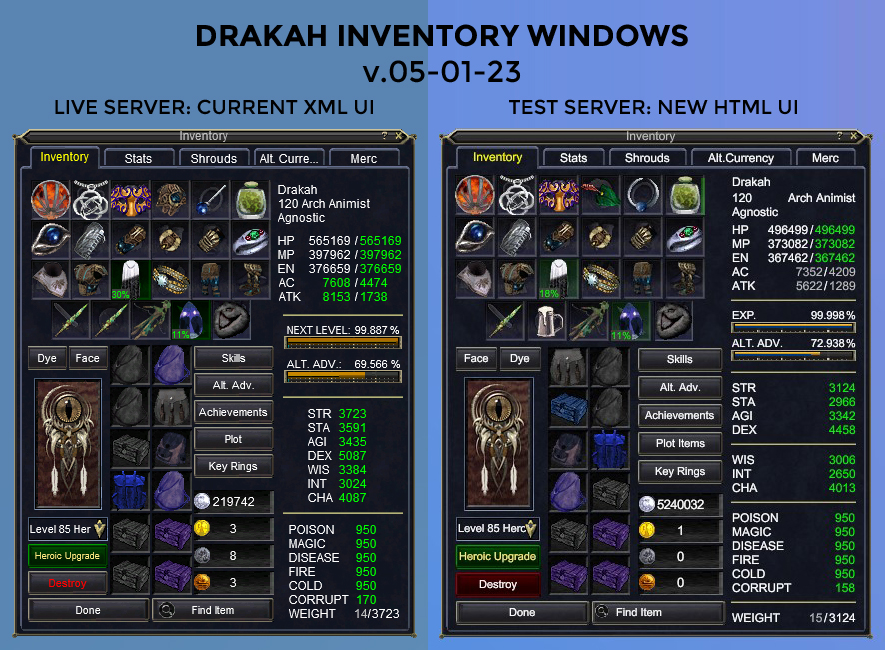
KeymasterWell, I was able to get some progress done on the “Global” version Inventory Window for all of the Interfaces I create using this layout It is not 100% accurate, but pretty darn close. This is just using the normal Default skin however, which is fine for the time being.
The 1st image is the Live version, 2nd image is on the Test server on the new UI code.
Attachments:
KeymasterIt won’t be on live for quite a while. I have been on the test server past several weeks just working on the Inventory window. So you can imagine how terrible this is.
KeymasterI am hoping too 🙂
KeymasterAll interfaces have now been updated.
KeymasterInterfaces have now been updated and uploaded to Version 18.3.
Do not use them until after the patch goes out on Wednesday, April 20, 2022.KeymasterThinking about this more on the way to work, I remember my old code “Pieces” had a Buff Icon Piece, then a Buff Icon Name Piece, then a Buff Icon Piece again, etc etc. which could possible display them separately when resized. But now that DBG has all the icons in 1 template on their own, the Buff names had to do the same… so possibly that is what throws off the alignment going up/down I am thinking. At some point I can revisit this to see if I can also make it compatible for vertical but for now, I believe you could place in an addon that is vertical without breaking the UI.
KeymasterThat is odd because all of my UI’s uses the same buff windows primarily, but all the layouts were created going horizontally, not vertically.
Are you sure you didn’t have a different buff window in your UI that replaced mine?
The only way my buff window would work vertically is if you did what I mentioned to the other user above, by removing the Pieces for the spell icon names, then you wouldn’t have any issues, but you would obviously loose the spell names.
Now I never personally, resized my buff windows to go up and down… so maybe with the update the alignment acts differently when stretched in that direction, I am not sure.
-
AuthorPosts
Recent Comments